
配置DHCP服务(华硕路由器版)
登陆梅林固件官网,基于路由器型号选择下载对应的固件
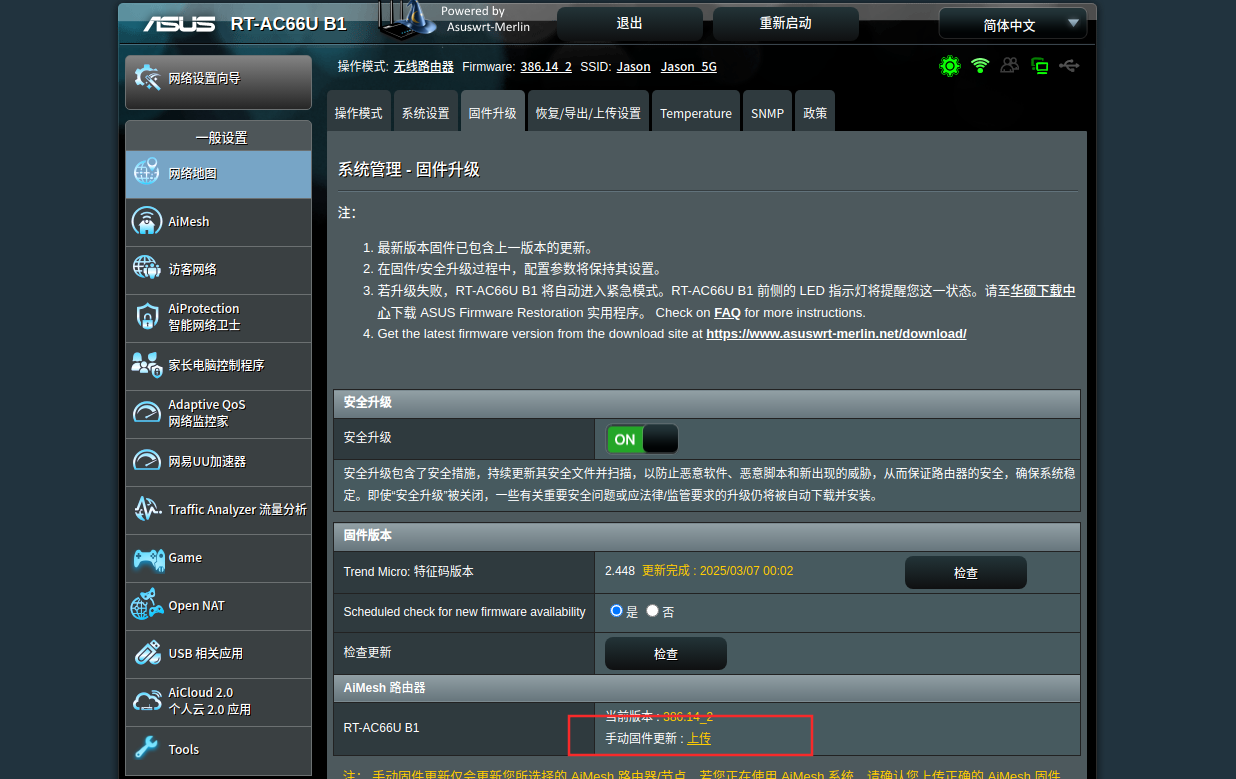
安装对应的固件,如下图所示
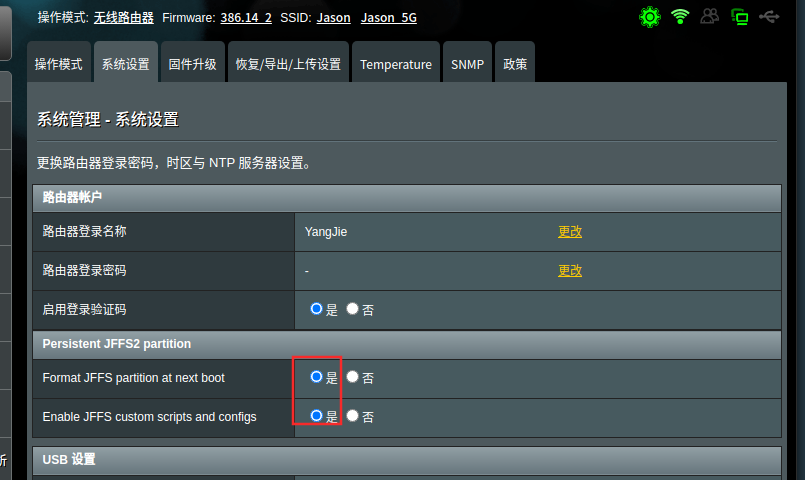
设置格式化JFFS分区,然后重启路由器
在/jffs/configs目录下增加dnsmasq.conf.add文件配置dhcp服务,指向tftp服务器地址,配置内容如下图所示(打码处为tftp服务器地址)

重启dhcp服务
service restart_dnsmasq配置TFTP服务
编辑Dockerfile构建镜像,需要新建entrypoint.sh和tftpd-hpa.conf,内容如下
[jason@Jason1991 tmp]$ cat Dockerfile
FROM ubuntu:20.04

RUN apt-get update && apt-get install -y \
    tftpd-hpa \
    tcpdump

RUN mkdir -p /tftp /var/log/tftp \
    && chmod -R 777 /tftp /var/log/tftp

COPY tftpd-hpa.conf /etc/default/tftpd-hpa
COPY entrypoint.sh /entrypoint.sh
RUN chmod +x /entrypoint.sh

EXPOSE 69/udp

ENTRYPOINT ["/entrypoint.sh"]

[jason@Jason1991 tmp]$ cat entrypoint.sh
#!/bin/bash
touch /var/log/tftp/tftpd.log
chmod 666 /var/log/tftp/tftpd.log

service tftpd-hpa start
tail -F /var/log/tftp/tftpd.log

[jason@Jason1991 tmp]$ cat tftpd-hpa.conf
# /etc/default/tftpd-hpa
TFTP_USERNAME="root"
TFTP_DIRECTORY="/tftp"
TFTP_ADDRESS="0.0.0.0:69"
TFTP_OPTIONS="-l -s -c -vv"
TFTP_LOGFILE="/var/log/tftp/tftpd.log"
编辑docker-compose.xml
version: '3'

services:
  tftp-server:
    image: ubuntu-tftp:latest
    container_name: tftp-server
    network_mode: "host"
    volumes:
      - /share/pxe/tftp:/tftp    # 将 TFTP 目录挂载到容器内
    restart: unless-stopped
使用docker-compose运行容器启动tftp服务
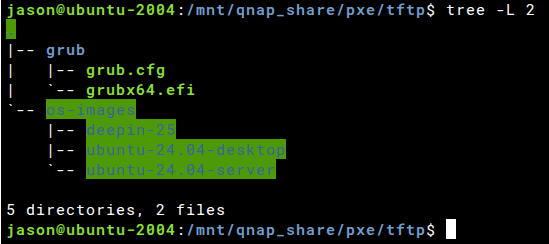
在tftp新建如下目录结构,使用网络引导时会下载grubx64.efi文件,grub.cfg为grub的配置文件,os-images目录下存放操作系统安装镜像(从iso文件拷贝)
jason@ubuntu-2004:/mnt/qnap_share/pxe/tftp$ cat grub/grub.cfg
set timeout=5
set debug=all
menuentry "Boot from local disk" {
  exit
}
menuentry "Install Ubuntu 24.04 desktop(UEFI)" {
  set root=(tftp,192.168.50.218)
  linux /os-images/ubuntu-24.04-desktop/casper/vmlinuz root=/dev/nfs nfsroot=192.168.50.218:/pxe/tftp/os-images/ubuntu-24.04-desktop/ netboot=nfs ip=dhcp ignore_uuid loglevel=7 ro
  initrd /os-images/ubuntu-24.04-desktop/casper/initrd
}
menuentry "Install Ubuntu 24.04 server(UEFI)" {
  set root=(tftp,192.168.50.218)
  linux /os-images/ubuntu-24.04-server/casper/vmlinuz root=/dev/nfs nfsroot=192.168.50.218:/pxe/tftp/os-images/ubuntu-24.04-server/ netboot=nfs ip=dhcp ignore_uuid loglevel=7 ro
  initrd /os-images/ubuntu-24.04-server/casper/initrd
}
menuentry "Install Deepin 25(UEFI)" {
  set root=(tftp,192.168.50.218)
  linux /os-images/deepin-25/live/vmlinuz-6.6 boot=live union=overlay livecd-installer locales=zh_CN.UTF-8 nfsroot=192.168.50.218:/pxe/tftp/os-images/deepin-25/ netboot=nfs ip=dhcp ignore_uuid loglevel=7 ro console=tty splash nomodeset --
  initrd /os-images/deepin-25/live/initrd-6.6
}
menuentry "Try Deepin 25(UEFI)" {
  set root=(tftp,192.168.50.218)
  linux /os-images/deepin-25/live/vmlinuz.efi boot=live union=overlay locales=zh_CN.UTF-8 nfsroot=192.168.50.218:/pxe/tftp/os-images/deepin-25/ netboot=nfs ip=dhcp ignore_uuid loglevel=7 ro console=tty splash nomodeset --
  initrd /os-images/deepin-25/live/initrd
}